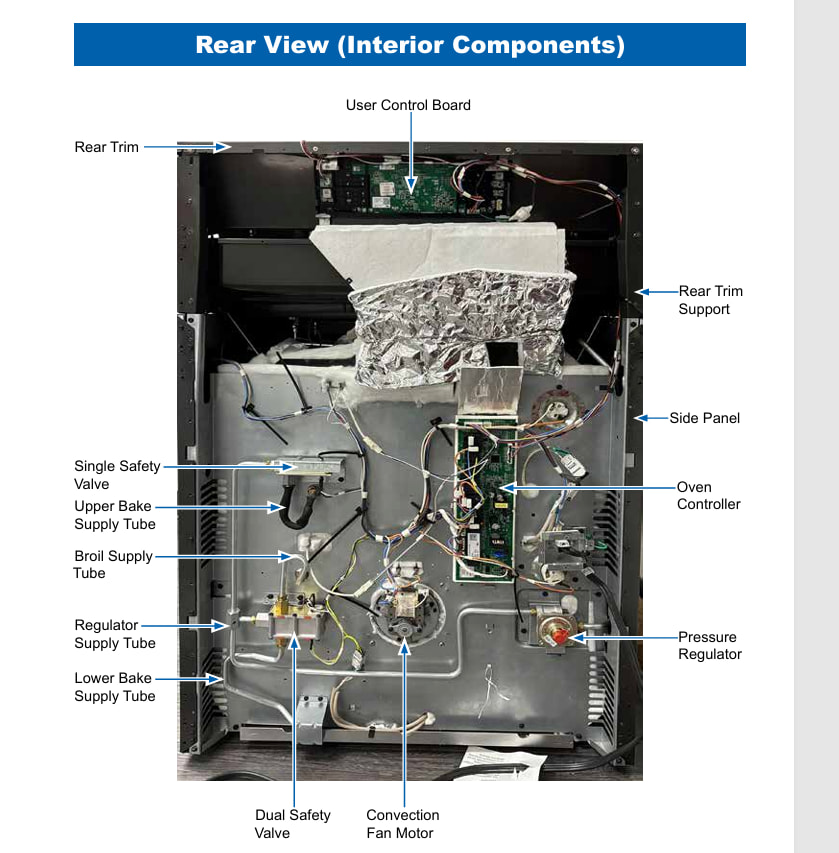
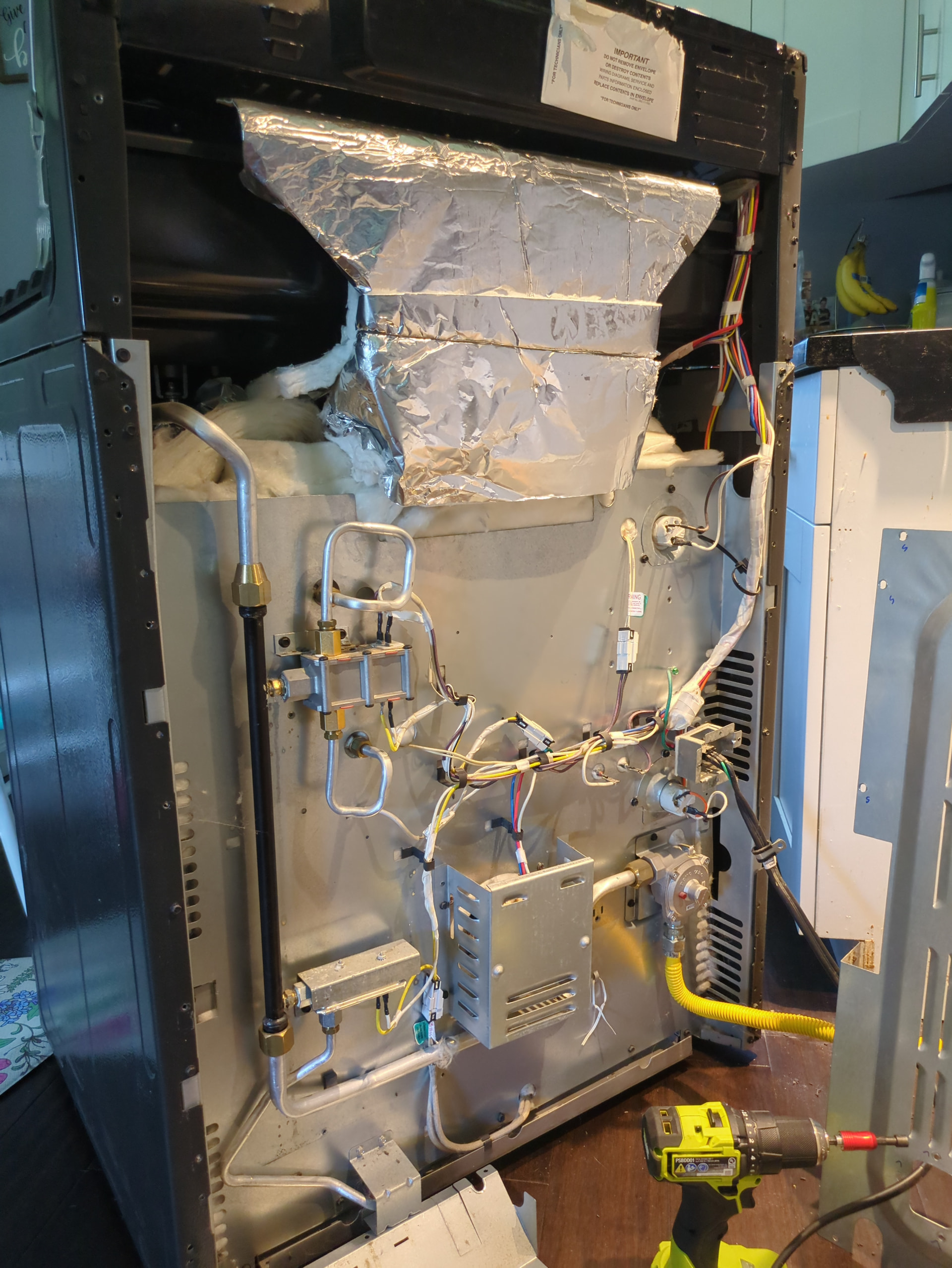
I have a GE double oven (model JGB860SEJ6SS), one of the ovens keeps temps and cooks as it should, the other will heat to temp and slowly loses temp after the initial heat up even though the display shows the correct temp.
I changed the thermocouple in that oven and it had no effect. Then I had a technician come out and they diagnosed it with a bad control board.
I ordered the control board and installed it but was unable to set the personality code via the available instructions ( within 5 minutes of power up, hold up and start for 2 seconds then use up and down to set the code ). I’ve used every combination of buttons I can think of and accessed the regular and testing menu for the board but I haven’t been able to figure out how to enter the personality code.
There are 2 start buttons on both the original and replacement board, and I’ve tried both using the 3 button as up like it is to navigate through the menus.
GE has been of no help and I have been told by alternating individuals at Bodewell (their parts and service subsidiary) that they do not provide installation instructions, that they do not provide this information to customers, and that the instructions I have found ( up and start ) are the solution to this. The GE automated parts service texting service has no record of this control board part number.
I am just looking for information on how to set the personality code, at this point I am planning on returning the part to GE so they don’t get to keep my money, but I want to make sure that I have a solution to this issue before I do that so that I’m not stuck with another expensive useless control board.
First question did you change the control board on the control panel or the oven control board on the back of the unit? To me the original issue sounds like
it is being caused by the oven control board. I am going to attach a tech sheet for reference. As far as setting the personality code I could find nothing in the GE service manual about it
Interesting, from the information I could find the interface panel assembly was the main control point. I don’t see another controller associated with this oven but if that is the one that I need that would be a great thing to know.
Is there a reason that appliance parts pros website lists that board as incompatible with my oven? I can’t find any information that ties that control board to my oven.
Yeah I’m getting conflicting information about whether yours has a separate board, Have you actually looked on the back and seen if there is a board, GE says some ovens in this models class have 2 , some don’t.
To set the personality code on your GE Gas Range (JGB860SEJ6SS), you must access the Field Service Mode and use the oven control to select the exact ID code listed on your range’s factory Tech Sheet. [1]
Locate the Tech Sheet:
Before starting, find the technical data sheet. It is typically tucked inside a plastic sleeve attached to the back metal panel of the range, or folded inside the oven storage drawer. The sheet contains a table that lists the exact personality code number required for your specific sub-model variant. [1, 2]
Programming Instructions:
Enter Service Mode: Ensure the oven is not running. Press and hold both the Bake and Broil pads simultaneously for about 3 seconds until SF (Special Features) appears on the display.
Access Personality Mode: Use the number pads to enter 3 - 7 - 9 - 5 (or check your specific tech sheet for the exact field service entry sequence).
Select Personality Code: Once in the programming mode, use the number pads or the dial to scroll until the personality code matches the number listed on your tech sheet (usually a 2-digit number, like 06 or 11). [1]
Save the Code: Press and hold the Start pad for 3 seconds to lock in the new personality. [1, 2]
Exit: Press Clear/Off to exit diagnostic mode.
If you are missing your range’s documentation, you can search for and download a copy of the official GE JGB860SEJ6SS User Manual or parts diagrams via Sears PartsDirect. [1]
Hold bake and broil for 3 seconds brings me to the special features menu, options include:
Offset
Sabbath
Sounds
End tone
12H shut off
Deg unit
Clock disp
Cloc cF9
AutoRecipe
None of them include SF or bring me to a place where I can do anything except change a specific option.
If I hold 1 and 5 for 3 seconds it bring up the test menu, which only says nA or 02000202 but can activate functions for testing oven functionality, like the fan for convection cooking.
I have not found any other way to get into a “service mode” including holding either start button with 3 (which is up in the menu) as this seems to be a common GE combination for accessing the service menu.