Brand: Whirlpool Model Number: WEE730H0DS0 Main Symptom: Display Board turns off, can’t bake. What happens & when: It was intermittent at first, then totally went off
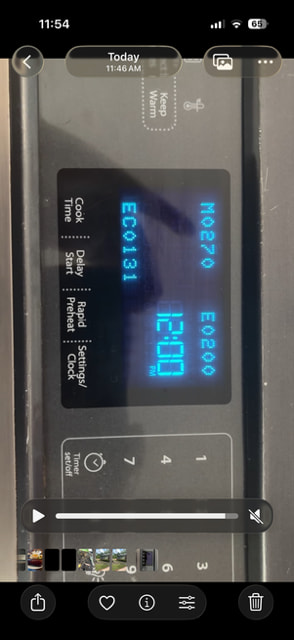
Error Code (if any): M0270, EO200, EC0131
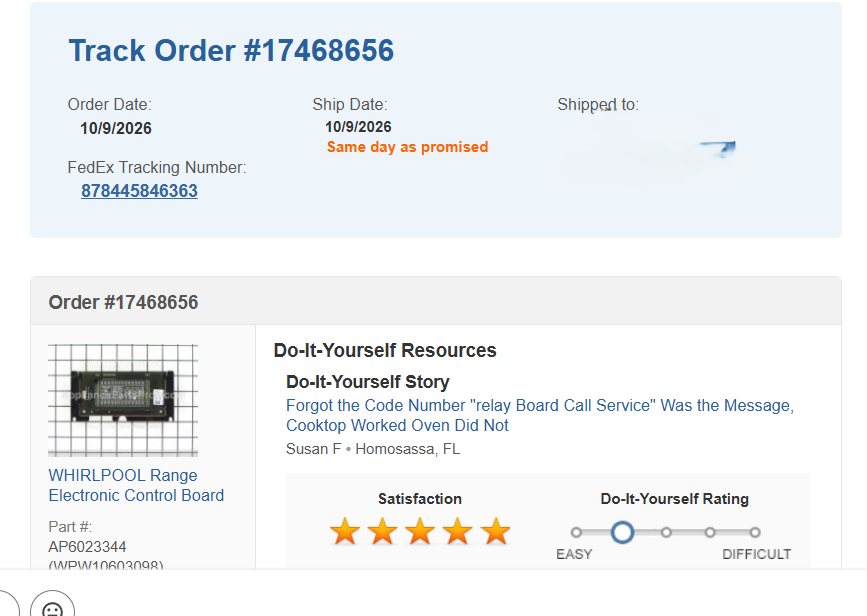
Parts or tests already tried: I already replaced part Part #:
AP6023344 (WPW10603098) but still getting same codes
Photos / video link:
For your Whirlpool range model WEE730H0DS0, since you’ve already replaced the control board WPW10603098 (AP6023344) and the display is still shutting off, I wouldn’t recommend buying another board just yet.
The fact that the problem started intermittently and eventually became constant makes me suspicious of a loose connection, damaged wiring, or a problem with the control panel’s power supply.
One important detail about your picture: M0270, E0200, and EC0131 don’t appear to be standard Whirlpool fault codes. They may be software or identification numbers displayed during startup rather than actual error codes.
Here’s how I’d narrow this down.
What I recommend checking next
1. Reset the range. Turn off the double-pole breaker for 2 minutes, then restore power. See whether the display returns and stays on.
2. Inspect the display wiring. With the breaker off, open the console and check the connectors between the new display board and the main control board. Look for loose plugs, bent pins, corrosion, or overheated connections.
3. Check the main control board. Your range uses a separate main control/relay board, W11050557. Since the display board has already been replaced, this is another possible cause.
Appliance Parts Pros
+1
4. Check the incoming voltage. If you’re comfortable using a multimeter, the range should have approximately 240 VAC between L1 and L2 and 120 VAC from each hot leg to neutral. A missing supply leg or loose neutral can cause control problems. These are live high-voltage checks, so use a qualified technician if you’re not experienced.
5. Check for actual fault codes. If the display responds, try pressing CANCEL, CANCEL, START to enter diagnostics and review stored faults.
Appliance Parts Pros
+1
My recommendation
Because you’ve already replaced WPW10603098, I would concentrate on the wiring between the boards and the main control W11050557 before purchasing anything else.
I have two questions that will help narrow this down:
When the display goes blank, do the buttons still beep when pressed, or is the entire control panel completely dead?
After turning the breaker off and back on, does the display show those numbers briefly and then shut off, or does it stay illuminated like in your picture?
Those two answers will help determine whether we’re dealing with a display communication problem or a main control power issue.
I will turn off the breaker for 2 minutes, then report back.
For clarity, with the new board in, the range just resets intermittently again. Meaning, every hour or so, it seems to disconnect and restart, we can tell by the clock resetting. So for now, we are able to push the BAKE buttons, etc. and the range warms up, it just restarts intermittently since I replaced the board.
But yes, when I turn off the breaker and turn back on, the codes show briefly, then disappear.
And yes, I can’t find those codes anywhere now, which is weird because I swear I found them previously when the issue started and it pointed me to replacing that board.
I will try the restart and look for bent pins, but I will say, it was an easy replacement to do and the connector snapped in easily.
I will also try the CANCEL, CANCEL, START and report any codes here.
Thanks for the update! Your voltage readings of 245V across L1 and L2, and 121V and 122V from each leg to neutral, look good. That tells us the range is receiving the proper incoming power.
Since you’ve already replaced the display/control board WPW10603098, checked the wiring, and reset the breaker without correcting the problem, I wouldn’t replace that same board again just yet.
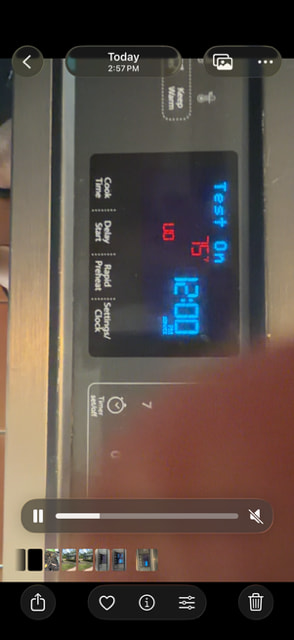
Looking at your picture, the display shows Test On with the time and temperature indicators. That suggests you’ve entered a test or diagnostic function, but it doesn’t necessarily mean the control has passed all its tests.
The important thing now is determining whether the display is losing power or whether another control component is preventing the oven from operating.
Here’s what I’d check next
1. Check the main oven control board. This is separate from the display board WPW10603098 you replaced. On this model, the main control operates the oven’s heating circuits, and a failure there could explain why Bake isn’t working. A model-specific troubleshooting reference also points to the main control for relay-board errors.
Appliance Parts Pros
2. Inspect the connections between the display board and main control. Turn off the breaker first. Look for loose connectors, backed-out pins, or damaged wiring, even if the insulation looks fine.
3. Check the control’s power supply. The voltage readings at the terminal block are good, but we still need to verify that the main control receives its required power. The exact test points should come from the model’s wiring diagram.
Based on everything you’ve tested, I’m leaning toward the main oven control board rather than the display board, but I’d like to confirm that before recommending another replacement.
One question: When you attempt to start Bake, does the display stay on and respond normally without heating, or does the entire display go blank?
That distinction will help us decide whether to focus on the main control’s heating circuit or its power supply.
All connections look good, tight, no damaged wiring.
Bake is starting and working just fine. What’s happening now with the new board, is that it is turning off and restarting, as we witness on the clock resetting to 12:00 every hour or so. Everything else works while it’s on.
Thanks for clearing that up! That changes our troubleshooting direction quite a bit. Since Bake and everything else work normally, but the clock resets to 12:00 approximately every hour, we’re dealing with an intermittent power or control reset problem, not a heating problem.
Your voltage readings of 245V, 121V, and 122V look good, but those readings only confirm the power was correct when you measured it. They don’t rule out an intermittent connection or voltage drop.
Here’s what I’d check next on your Whirlpool WEE730H0DS0.
1. Check the power connections again. With the breaker off, inspect the terminal block, power cord connections, and neutral connection. A loose neutral can cause intermittent control resets even when the oven otherwise works.
2. Check the power reaching the electronic control. If you’re comfortable performing live-voltage testing, use the wiring diagram to identify the control’s 120V supply and neutral. The important thing is whether that voltage remains steady when the display resets. Don’t assume a connector pin is neutral without confirming it on the diagram.
3. Check the control’s low-voltage connections. Since you’ve replaced WPW10603098, inspect the harness connecting that board to the other electronic controls. A poor connection could interrupt communication or power and cause the display to restart.
4. Consider the replacement board. If the control has a steady 120V supply during a reset, the replacement board itself or another control supplying it becomes a stronger suspect.
Here’s one simple test I’d like you to try before buying anything else.
Set the clock, leave the oven off, and see whether it resets again after approximately an hour.
If it resets while the oven is completely idle, that points us more toward the control’s power supply, wiring, or an electronic control problem rather than anything in the heating circuit.
Also, when the clock resets, does the entire display briefly go blank and then return showing 12:00, or does it simply change to 12:00 without going blank?
Try jiggling the wires at the junction block all the way up to the display see if the movement causes the display to reset.
That distinction will help us determine whether the control is actually losing power or restarting internally. I wouldn’t recommend another board until we’ve narrowed that down.
I did check the harness, it seems to be connected fine.
I am not comfortable doing that testing using the wiring diagram for now, may be able to after researching.
And also, when the clock goes to 12, it blacks out first, then returns with the 12:00 reading.
I will let you know if we lose power in the next hour.
Is it possible we’ve reset it with the power off? I’d hate to spend another $250, but it seems everything is pointing to that other control board. I guess I ordered the wrong one?Ugh.
Well, that actually tells us quite a bit! Since your Whirlpool WEE730H0DS0 restarted again with nothing running, we can pretty much rule out the bake and broil elements causing the reset under load.
The fact that the clock keeps resetting to 12:00 suggests the electronic control is briefly losing power or resetting internally.
Since you’ve already replaced the control board WPW10603098, verified the incoming voltage at 245V (121V and 122V to neutral), and checked the connections, I wouldn’t rush to replace another board.
Here’s what I’d check next:
1. Check the 120V supply at the control board. With the range powered on, measure between the board’s incoming L1 and neutral connections. You should have approximately 120 VAC. The important part is whether that voltage remains steady when the display resets.
2. Check the neutral connection. Even though the connections look good, a loose or failing neutral can cause intermittent resets. With the breaker off, inspect the terminal block and neutral wiring carefully.
3. Check the control panel wiring. Inspect the harness between the user interface and main control. A poor connection or intermittent short could cause the electronics to restart.
4. Consider the replacement control board. If the 120V supply remains steady during a reset, the new control board or an attached electronic component becomes a stronger suspect.
Live Power Warning: Voltage testing involves exposed 120/240V connections. Only perform these checks if you’re comfortable working around live electrical circuits.
My next question
When the range restarts, does the entire display go completely blank for a moment and then return showing 12:00, or does the clock simply change to 12:00 without the display going dark?
That distinction will help us determine whether the control is losing power or resetting electronically.
It just happened when I was nearby. I heard it clicking, then the light/time goes off, then it powers back on displaying as it does when I turn the breaker back on with those codes and bars like rows. Cooktop works all the time, yes.
I’m definitely leaning toward a control-board power supply issue on your Whirlpool WEE730H0DS0.
Since you’ve already replaced the WPW10603098 control board and the range is still randomly rebooting, I’m wondering whether the replacement board could be defective.
Where did you purchase the replacement control board? Was it a new OEM Whirlpool board, a refurbished board, or an aftermarket replacement?
That could make a difference in what I’d recommend checking next.
One other important detail: Your model actually uses two electronic boards—the display control WPW10603098, which you’ve replaced, and the main control W11050557.
Ships Today! 365-Day Returns
+1
So we also need to consider the main control and the wiring between the two boards before blaming the new display board.
The screen has been “going dead” and restarting after approximately 1 hour all night and day. Now it’s gone completely dark for some time. Can confirm the stovetop still works fine, but can’t push any of the “BAKE” features obviously.
Do you think the parts is defective? What can I do next?