Please make sure to click on General above and select the correct appliance type first.
Brand:Speed Queen Model Number:AWN632SP116TW02 Main Symptom:Stops during fill cycle What happens & when: The problem I’m having is that is does not complete a full wash cycle. After a few minutes of the wash fill cycle, it will just stop filling. The two middle Status lights, Wash & Rinse, will blink twice, wait several seconds and blink twice again. This blinking goes on and on. At first, if I unplugged the unit, waited 10-15 seconds, plugged it back in, and hit the start button again, it would finish the wash cycle and rinse cycle and everything worked. Then it would get to the point where it would do the same thing on the rinse cycle, stop filling after a few minutes. I have to once again unplug, wait, plug back in, and try to get thru the rinse cycle. However, because unplugging from power sort of resets everything, the machine thinks it’s starting from scratch and after the spin cycle, it tries to do another rinse cycle, stops in the filling portion of the cycle and it becomes a never ending loop. I have to stop it again, and then manually select a rinse cycle and am finally able to finish a complete load.
I ordered a new circuit board from your company in May, and everything started working again the way it was supposed to. However, a couple of months ago it started repeating the problems again. I’m having to constantly hover over the machine and make manual starts and stops just to do a load of laundry.
I have also looked at the screens at the water valve on the machine, and the hot water screen did have deposits. I didn’t see an easy way to remove the screens and clean them so I had to try to remove the deposits as best I could. Do the screens come out for cleaning, or do I have to replace the entire valve?
Any advice or suggestions you can provide would be greatly appreciated.
Error Code (if any):
Parts or tests already tried:
Photos / video link:
Thanks for the detailed explanation! You’ve done a great job describing what’s happening, and the fact that replacing the control board temporarily fixed the problem is an important clue.
On your Speed Queen AWN632SP116TW02, I’m particularly interested in the Wash and Rinse lights blinking twice repeatedly. That sounds like the washer may be detecting a fault and stopping the cycle rather than simply losing power.
Since the problem happens during both the wash and rinse fill portions, I’d like to concentrate on the water inlet valve, water supply, and water level sensing system before considering another control board.
1. Check the water inlet valve and screens
You mentioned finding deposits in the hot water inlet screen. That’s definitely worth investigating.
The inlet screens are generally designed to remain installed in the valve. I wouldn’t recommend pulling them out because doing so can damage the screens or allow debris into the valve.
Here’s what I’d suggest:
Unplug the washer and turn off both water supply valves.
Disconnect the hot and cold water hoses from the washer.
Inspect both inlet screens for sediment or mineral buildup.
Carefully clean the screens with a soft brush without pushing debris farther into the valve.
With the hoses disconnected from the washer, direct each hose into a bucket and briefly open its supply valve to check for strong, steady water flow.
If the screens are badly clogged and cannot be cleaned adequately, replacing the water inlet valve assembly may be necessary.
2. Check the water level pressure hose
The washer uses a pressure-sensing system to determine how much water is in the tub.
If the pressure hose is restricted, kinked, loose, or leaking air, the control may receive an incorrect water level signal.
With the washer unplugged, inspect the small pressure hose running from the tub’s air chamber toward the water level sensing components.
Look for damaged tubing, loose connections, or obstructions. Avoid blowing compressed air into an electronic pressure sensor.
3. Pay attention to when the washer stops filling
This is probably the most helpful test we can do next.
Start a normal wash cycle and watch what happens when the washer stops filling.
If the water stops before reaching the normal level: We may have a water supply, inlet valve, or water level sensing problem.
If the tub reaches its normal water level and then stops: We may be dealing with a different fault involving the control system or the transition into agitation.
If the water flow gradually slows before stopping: That would make me more suspicious of a restriction in the water supply or inlet valve.
4. What about the control board?
Since replacing the control board corrected the problem for several months, I wouldn’t completely rule it out.
However, I wouldn’t recommend purchasing another board until we identify what the blinking lights indicate and verify that the valve and pressure system are operating correctly.
The repeated two-blink pattern may be a diagnostic indication, but I’d want to verify its exact meaning for your model rather than assume it identifies a particular failed component.
A couple of questions
Before we go further, could you check two things for me?
1. When the washer stops filling and the Wash and Rinse lights begin blinking, is there already a normal amount of water in the tub, or is the water level still low?
2. When the washer stops, does the water shut off suddenly while it is flowing normally, or does the flow gradually slow down before stopping?
Those two answers, along with the blinking light pattern, should help us narrow this down without having you replace another expensive control board unnecessarily.
Thank you for the response. For question #1, it has been stopping when the water depth is only about 3 inches high from the bottom of the tub. For question #2, as far as I can tell it is a sudden stop, like it would do when the tub is at its normal fill height, and not a gradual slow down.
For your Speed Queen AWN632SP116TW02, the fact that the washer stops filling suddenly when the water is only about 3 inches deep is helpful.
Since the water shuts off abruptly rather than gradually slowing down, I’m leaning away from a restricted water supply or clogged inlet screen.
Instead, I’d like to focus on the water-level sensing system, which tells the control when the washer has reached the correct water level.
However, the 3-inch water depth alone doesn’t necessarily mean the washer is underfilling. These machines can use different water levels depending on the selected cycle and load size.
The bigger concern is that the washer stops and the Wash and Rinse lights begin blinking instead of continuing through the cycle.
I also checked the owner’s manual for your model, and it confirms that two flashes of the Wash and Rinse lights indicate a fill-related error. The control may be detecting that the water level isn’t increasing as expected, even though water has entered the tub.
User manual and instructions+1
Before we start taking anything apart, I’d like you to try one simple test.
Unplug the washer for at least 15 seconds to clear the error.
Select a Heavy Duty cycle with the Deep Fill option.
Start the washer with the tub empty and watch it fill.
See whether it stops at approximately the same 3-inch depth or continues filling.
Also, could you tell me approximately how many minutes the washer runs before it stops and the lights begin blinking?
That timing is especially important. If it consistently stops after about five minutes, I’d want to investigate water flow and the pressure-sensing system before considering a replacement control board.
Let me know what happens, and we’ll narrow this down without replacing parts unnecessarily.
I did what you outlined, using warm water. I let it fill for 15 minutes and it never shut off. The water depth was a little over 9 inches, more than half way up the tub, and I’m certain is more water than would normally be used if it were full of clothes.
Thank you for running that test and sharing the results. That tells us quite a bit.
If your Speed Queen AWN632SP116TW02 continued filling for 15 minutes and reached over 9 inches of water without stopping, that’s definitely concerning, especially since you were previously seeing the washer stop filling after only about 3 inches.
At this point, I’m more suspicious of the water-level sensing system than the water inlet valve itself.
The washer uses a pressure-sensing system (Speed Queen 202470 Washer Sensor,Pressure | Genuine OEM Part) to determine how much water is in the tub. If that system isn’t detecting the water level correctly, the control may not know when to stop filling.
Before replacing anything, I’d like to narrow this down with one more check.
Here’s what I’d like you to do:
With the washer unplugged and the water supply turned off, inspect the small pressure hose that runs from the outer tub to the water-level sensing system. Look for a loose connection, a kink, damage, or anything that might prevent air pressure from reaching the sensor.
Don’t blow compressed air into the sensor or pressure switch, since that could damage it.
There’s another important clue here. According to Speed Queen’s troubleshooting information, the Wash and Rinse lights blinking twice indicate that the washer isn’t detecting the expected increase in water level. That can happen even when water is physically entering the tub.
User manual and instructions+1
If the pressure hose and its connections look good, the pressure sensor itself becomes a stronger suspect. Your model uses pressure sensor 203843, but I’d want to rule out a hose problem before recommending replacement.
Sears PartsDirect+1
One question: During that 15-minute test, did the water level keep rising the entire time, or did it reach approximately 9 inches and stay there while water continued running?
That will help us determine whether the washer is failing to recognize the water level or possibly losing water through the drain as it fills.
For now, I wouldn’t run another unattended fill test
As far as I remember noticing, the water level was rising pretty consistently the entire fill. Question, to inspect the pressure hose and sensor, do I need to remove anything, such as the top or back panels? I am not sure exactly where the hose and sensor are located.
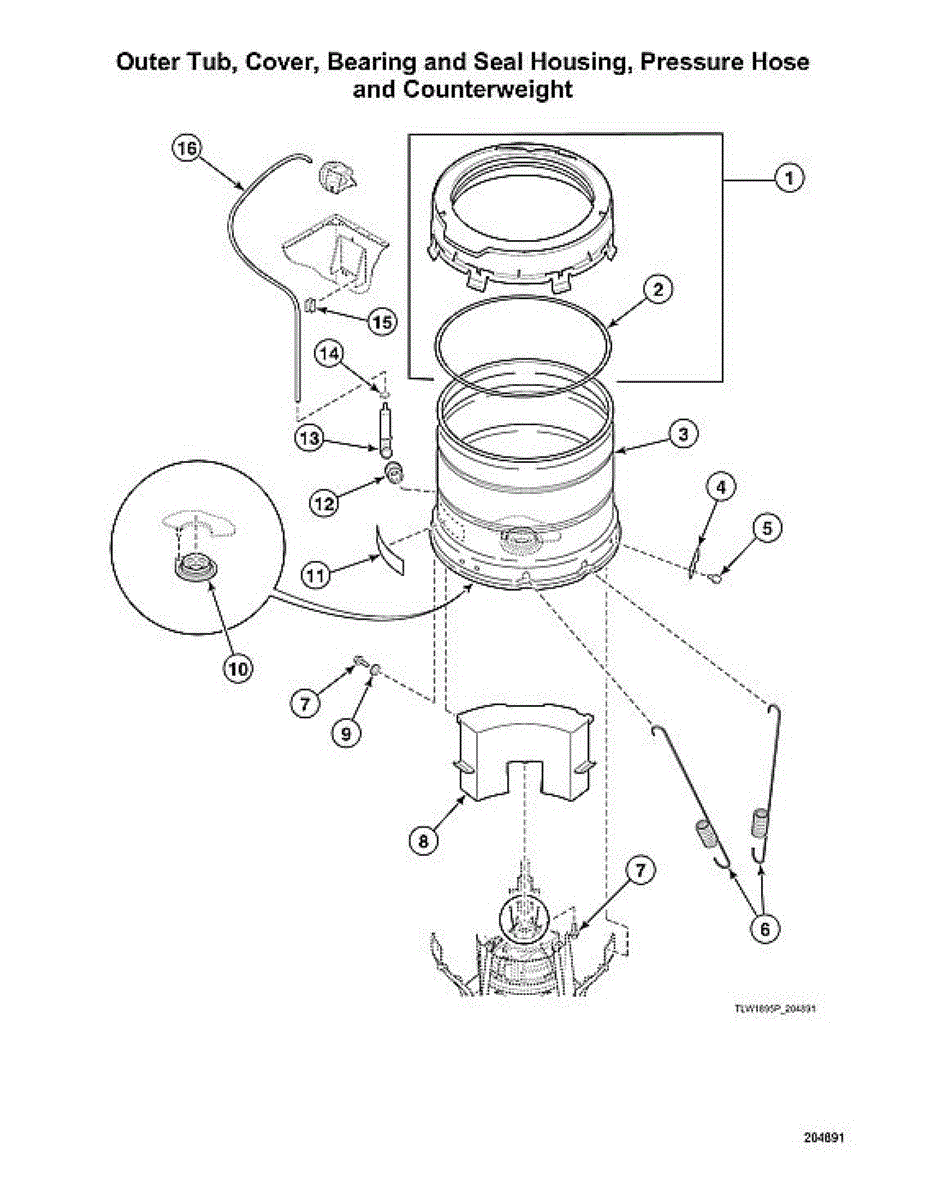
Part number 12 on the first image is the pressure hose
Part number 16 on the second is the pressure sensor
They are both accessed from inside the cabinet
Okay, thank you. It will probably be a day or two before I’m able to get into to look at those. I’m wondering, did you possibly swap the part number and part descriptions? Part number 12 looks like it might be a sensor and Part 16 looks like a hose. Just want to make sure at what I’m looking at.