Samsung Refrigerator icing up behind evaporator panel

Brand: Samsung
Model Number: RF263BEAESR/AA
Main Symptom: Ice buildup behind evaporator cover
What happens & when:

Error Code (if any): 22: FF-FAN Error, 25: FF-DEF Error
Parts or tests already tried:
Photos / video link:

My Samsung refrigerator has started icing up behind the evaporator cover. I discovered the drain is clogged, so I’m going to deal with that, but I think there’s more than that going on as the drain has been clogged for awhile, which I realized because for the last few years I’ve had to remove water/ice beneath the deli drawer and as far as I know wasn’t getting the ice build-up. Then a few weeks back the fan started making noise as it was hitting the ice. I removed the evaporator cover and completely defrosted it but it reoccurred. I ran the diagnostics and got the errors above (22 - FF-FAN and 25 - FF-DEF)

I have since purchased one of those heater element extenders to reach into the drain so it doesn’t freeze up, but before proceeding I’d like some advice.

  • Would the clogged drain in-and-of itself cause the icing issue?
  • Since the fan is still working, I don’t think that’s the issue. And the temperature is properly maintained - I checked the display on the front against an appliance thermometer and it matches perfectly (both refrigerator and freezer) so I think the thermostat is fine
  • I’m leaning towards it being the refrigerator defrost thermostat DA47-00243K

Any help greatly appreciated - thank you!

Edit: I was in the kitchen just now and remembered (upon hearing it again) - every so often I hear a kind of random clacking sound, not very loud and random, it kind of sounds like the ice or coils expanding or contracting or something. Not the same sound as the rotating fan hitting the ice. Maybe just a symptom of the ice buildup.
The fan error is most likely being caused by a defrost issue. This could be due to a failed defrost heater or defrost thermostat.

The defrost heater can be tested for resistance and should measure around 120 Ohms. If the reading is more than ±10 Ohms off from this value, the heater has failed.

The defrost thermostat should be tested for continuity while the evaporator is frozen. If there’s no continuity in that condition, the thermostat has failed.

Here is a link to the defrost heater for your model:

Here is a link to the defrost thermostat for your model:

1 Like

Thank you for that! I actually have those items in my cart already, but I was hoping you would provide the testing information. I will do as you instructed and see what I can discover.

Thanks again.

Ok I need some more help.

I ordered and replaced both of these parts (defrost heater and thermostat) a little more than a month ago. The heater tested bad as per your instructions (it was up around 400 Ohms as I recall. Also want to note that the new one tested 140 Ohms out of the box, if that matters. I thought maybe that was my meter being less than accurate). The thermostat tested ok but I’m not sure if the proper “icing condition” existed - the icing was concentrated at the upper right of the coils, not near the thermostat itself, but in any case as I had it opened I just replaced it anyway.

But now as of last night I can hear the icing has returned, the fan is making an awful racket again and I can see ice through the ventilation holes.

Before I open it up again to defrost, I was hoping for advice on anything else I can check.

Thanks.

Would you be able to provide a picture of what kind of frost build-up is on the evaporator?

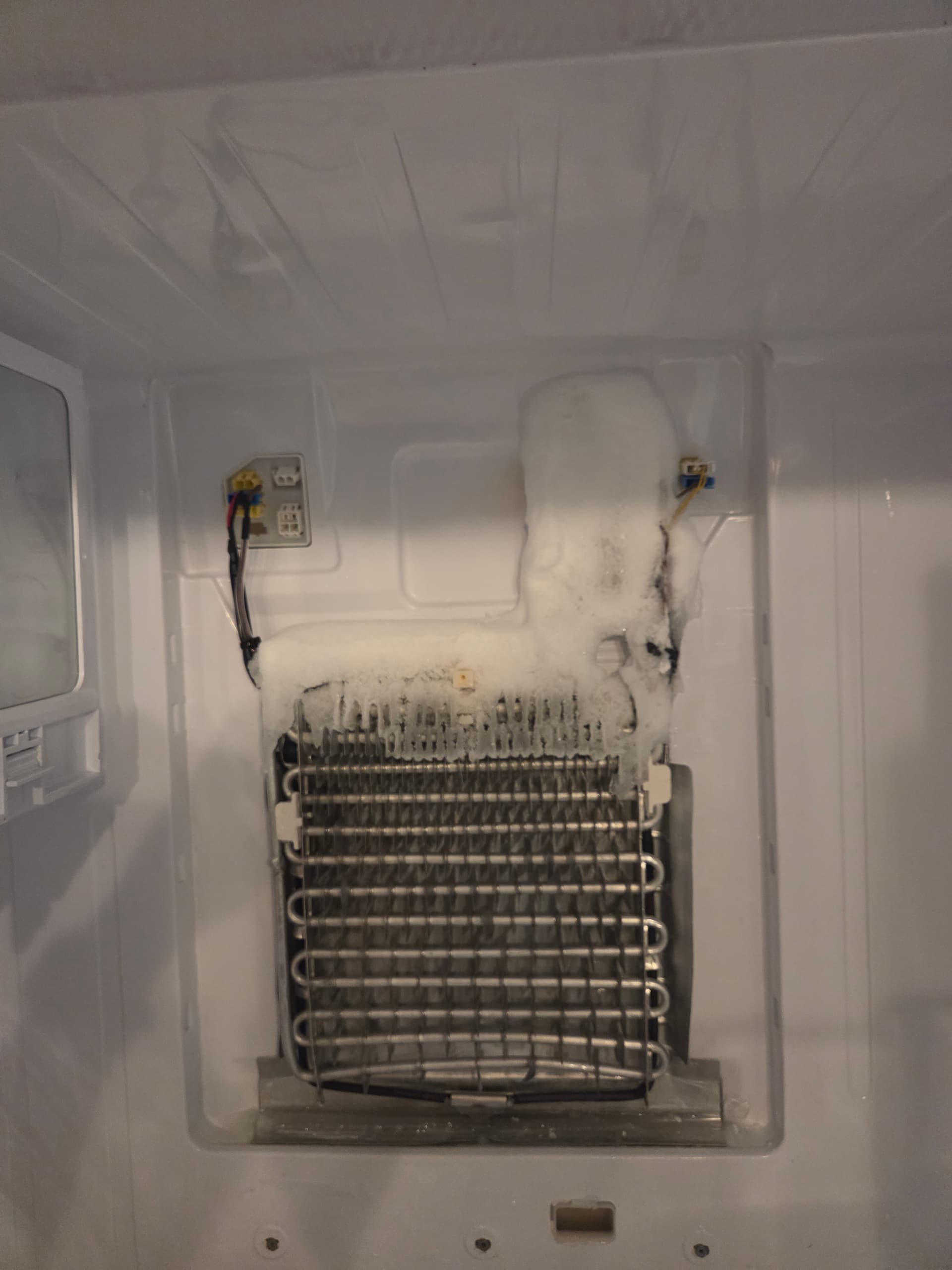
Actually yes. This was the last time I opened it when I replaced the thermostat and heater.

I’ll note that I don’t believe this was the full extent of the icing as I had to defrost it quite awhile before I was able to remove the panel.

Thanks again

I can’t tell, but is there standing water in the drip tray under the evaporator? If there is, it can cause the evaporator to ice up quickly. Aside from that, the ice pattern is consistent with a defrosting issue. Since the defrost heater and thermostat have been replaced, that rules them out. The original defrost heater testing out at 400 Ohms is definitely a failing part. The next step is testing the double yellow wires at the top right for resistance. What ohms reading is there and if it’s not covered in ice, what is the ambient temperature near it when a thermometer is placed next to it?

I was previously getting standing water in the drip tray - I removed the panel once before - but I had researched it some more and when I opened it up last month to replace the heater and thermostat, I cleared the drain, which was packed with ice, and added an extension to the heating element (that replaced the tiny factory one) that reached down into the drain to keep it from refreezing. I think it worked because prior to that for many months I kept getting water and ice under the deli tray from the water overflowing from the drain pan, and that hasn’t returned.

I can test those wires when I open it up again, hopefully tomorrow.

Not sure what you mean by the ambient temperature at that spot. Do you mean after I open it up? I assume it would just be room temperature at that point. I did purchase two refrigerator/freezer thermometers and both compartments consistently match the settings on the front control panel.

As the defrost/evaporator thermistor sits directly on the evaporator, the temperature it would sense will be different than the rest of the cabin since it is so close to the evaporator. Placing a thermometer next to it while testing for resistance ensures that the most accurate test is done. The exception being if it is encased in ice. If it is encased in ice, just the resistance would be needed since it identifies how much resistance it should read at a minimum.

Ah, ok, got it. I will report back by later today or tomorrow.

Thanks again.

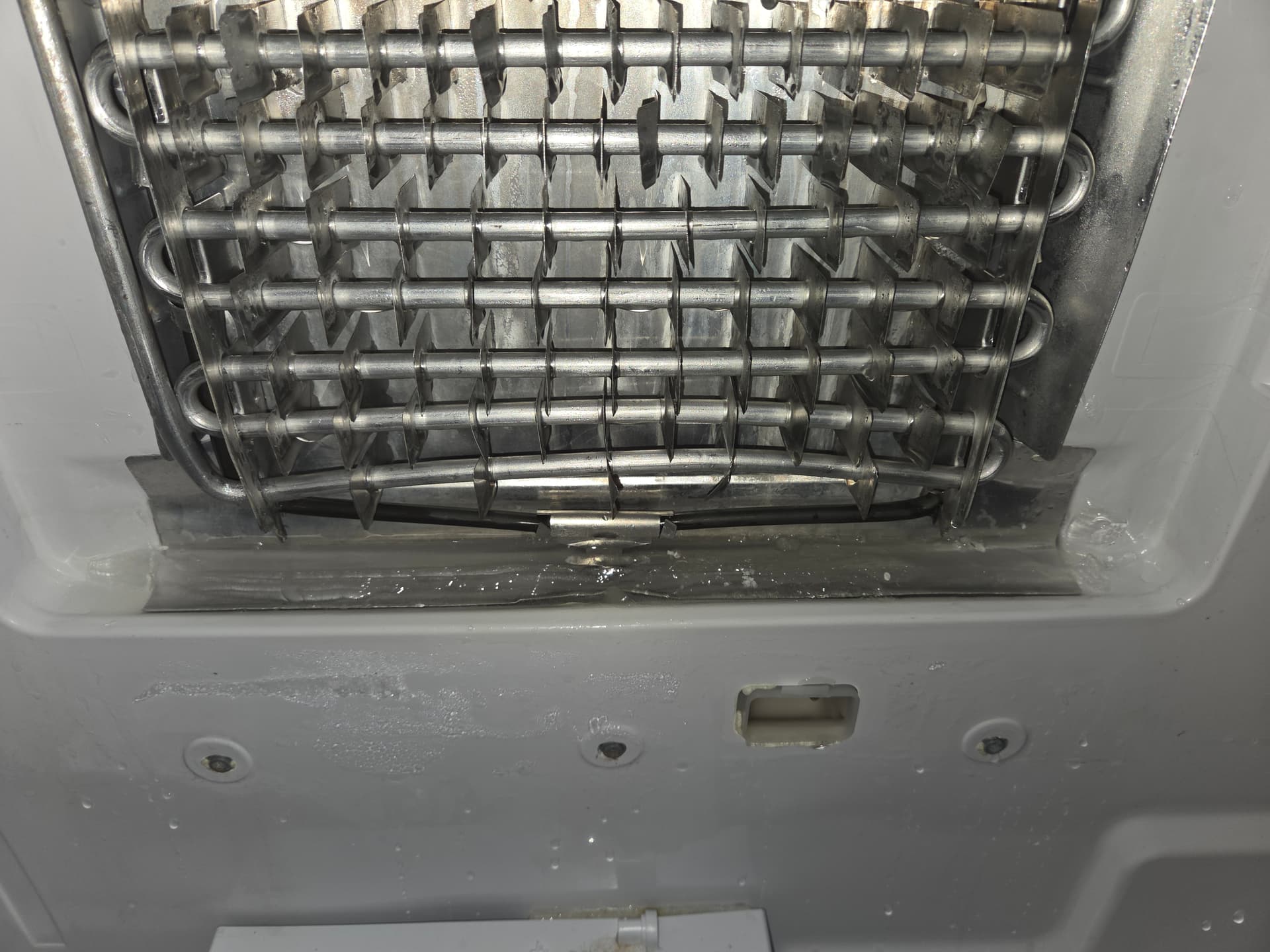
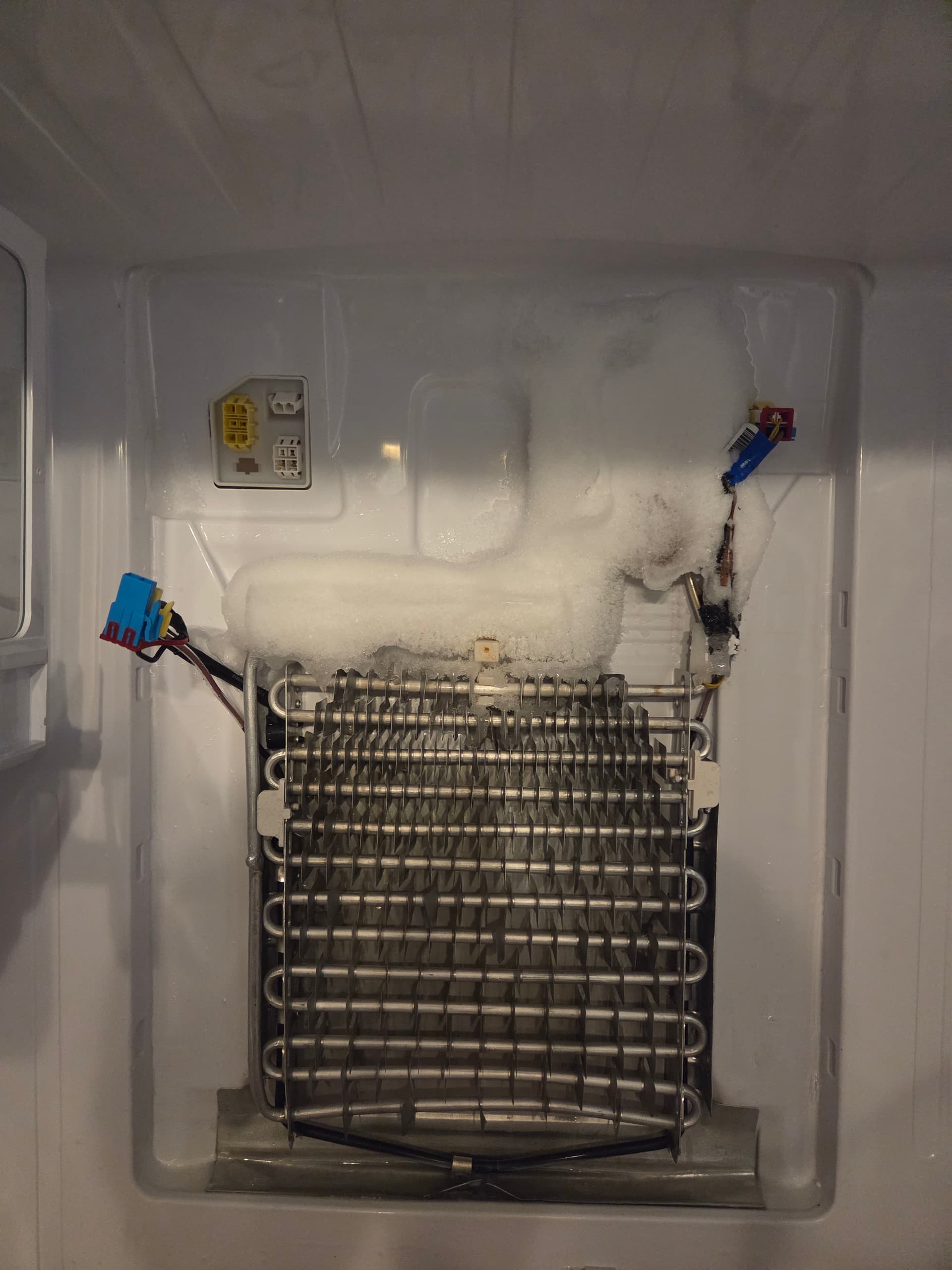
When I got this opened, it was iced up as shown in these pictures:

In the second picture, I was trying to show how the drainage tray is indeed packed with ice. So I did not if fact clear it last time. I spent a lot of time trying to do so without success. There did seem to be an indented area around the metal flange that seemed to indicate it was being warmed at that point.

I removed the rear panel and the exit tube from the drain was completely dry. After melting off all of the visible ice, I stuck a fairly stiff wire in it and it went in about 4”. Assuming it was an ice blockage, I tried repeatedly pouring hot water into the drain hole, siphoning it off each time with a turkey baster to get as much water as possible out of the drain hole. I did this for along time, but I was never able to get the wire in more than about 6” before hitting the blockage, and more hot water didn’t seem to help any more. I also tried sticking the wire up from the bottom (at the back of fridge, I removed the rubber hose and attachment first, it was clear) and also hit a blockage about 6” or so in. After an hour or so of this, there was no more progress on the top blockage, and no water ever came out at the bottom, so I don’t think it’s ice as by that point it should have started melting.

I’m unsure what could be blocking it or how aggressive I should be in trying to clear it. Is it just a straight PVC path to the bottom or something? So I need some advice about that.

I did try to use the multimeter as you suggested but it’s not something I’m very familiar with - i.e., I don’t really know what I’m doing! - so not sure how useful the results are. First off, when I started I wasn’t sure if you meant test the wire side (In the disconnected plug) or the socket side, so I did both. I tried several of the settings in the Ohm section of the meter as, again, I don’t much understand this. So low confidence in these numbers.

On the socket side, I got the same results testing with the ice as in the pictures, then again after I melted off the ice, so the temperature was the same as the room, about 75 F.

Here’s the multimeter settings and results:

Wire side:

Continuity through 200K setting all yielded 1.0
The 20m setting showed 0.4 with icing, .01-.02 at room temperature

Socket Side:

Continuity setting: 1.8-1.9
200 = 1
2k=1
20k = 10.8
200k = 11.7
20m =0.01

Everything has been closed up again, as I need to use the unit. I have only a mini fridge to cram stuff into, and the frozen stuff I’ve just been leaving in there without opening the section until it’s plugged in and back to normal temperature again - I cranked it cold overnight ahead of time, and it seems to be ok for a few hours.

My apologies, I know this is long, but whenever you can digest and offer advice I would appreciate it. Thanks as always.

For the defrost drain, hot water and siphoning it would be the best route but it can take a while. The drain tube is not a straight shot so running a wire down it would not be advisable. Identifying if it is clear would be done by checking to see if water starts going into the pan near the compressor. For the defrost evaporator sensor, it looks like it is measuring temperatures around the mid-40’s. With it being encased in ice, it should be reading a higher resistance. Clearing the defrost drain until water drips down into the tray near the compressor and replacing the defrost evaporator sensor would be the steps I would take. DA32-10104N Refrigerator Temperature Sensor | Genuine Samsung OEM In Stock

Ok, got it re: drain. Question though about the temperature sensor - since I always need to warm the panel first with a hair dryer before I can get it off (although only a minute or two this time), could that have affected the reading? For $38 I’m inclined to just replace it anyway, but on top of the other parts I’m $200 in, not to mention all the time I’ve invested. Not that a new refrigerator is in the cards either tbh.

Something else - within the first day of defrosting I also get some ice in the compartment to the right of the panel (see picture) - does that indicate anything? I have the temperature set to 38F which i believe is the default, and I’ve checked with 2 different thermometers to be sure it’s accurate.

Thanks.

Warming the panel should not effect the sensor since it is encased in ice. If it were exposed directly to the air, it would be a different story. Since the vent is right there, it could be that moisture is freezing from being exposed to air coming directly off of the evaporator. Was there any droplets of water there when you put everything back together?

Ok, makes sense about the sensor.

I tend to dry everything before turning the refrigerator back on, and actually ice has been forming in that exact spot for a long time, even before these issues started.

It just occurred to me that I always have the milk carton(s) right in front of that spot. I wonder if the air flow from the evaporator is just bouncing around in that spot and causing condensation and freezing. I’m going to try moving them.

That is a possibility, or it could be a result of the evaporator blocking up with ice. Once the defrost drain is thoroughly cleared and the sensor addressed, I would definitely monitor things.

Hi,

Is there any frosting on the lower tubes of the evaporator?

Yes, and then you -may- have a defrost issue.

No, and then your issue is not the defrosting but a refrigeration issue.

jeff sr.

ASC20140703001.pdf (515.5 KB)

Ok. I’m going to order the temperature sensor and give it another go when it arrives.

I haven’t had any icing on the lower tubes, but again, there’s significant icing in the drainage tray at the bottom, and I’ve had to defrost some before I’m able to remove the back panel.

If it’s a “refrigeration issue”, what would the other symptoms and solution be? The compartment is cooling normally (as is the freezer).