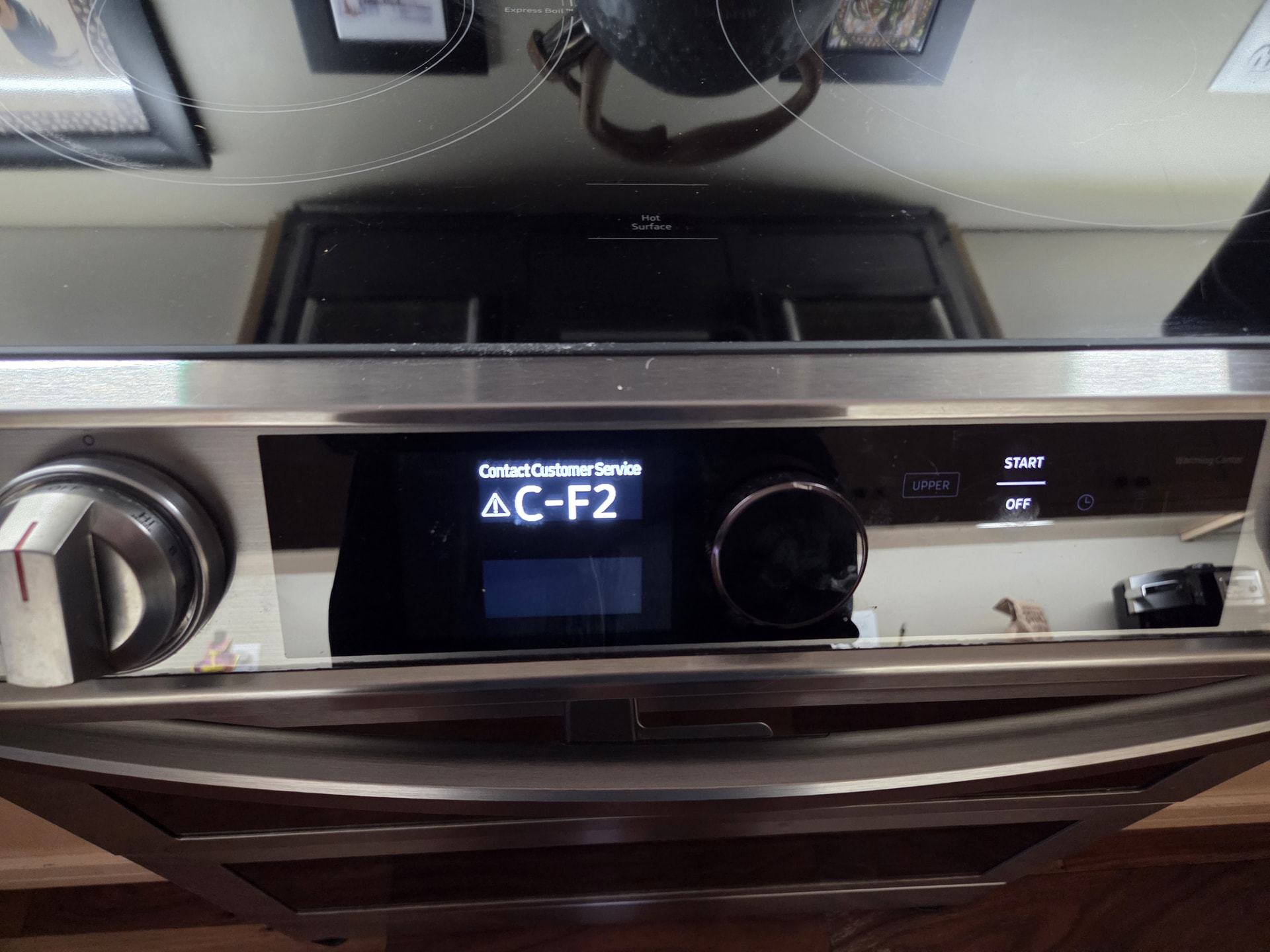
Brand: samsung Model Number: ne638651ss Main Symptom: error code c-f2 What happens & when: The oven does not work. The touchpad is nonresponsive.
Error Code (if any): c-f2
Parts or tests already tried: installed a new Samsung controller board. We still get the same error code. The range top works but the oven does not. The keypad is non responsive.
Photos / video link:
For your Samsung NE63B8651SS, the C-F2 error code points to a communication problem involving the touch control panel and the oven’s electronic controls.
Since you’ve already replaced the controller board and the same error returned, I would focus on the touchpad/user interface assembly and its wiring connections before replacing another main board.
Here’s what I recommend checking next:
1. Reset the range. Turn off the double-pole breaker for about 5 minutes, then restore power. If C-F2 returns immediately, that suggests an ongoing communication problem rather than a temporary glitch.
2. Inspect the control connections. Turn the breaker off again. Access the control panel and inspect the ribbon cable and wiring harness connecting the touch controls to the main board. Look for loose connectors, bent pins, corrosion, or damaged wiring. Disconnect and carefully reseat the connections.
3. Check the touchpad assembly. Since the touchpad is completely unresponsive, a failed touch control/user interface assembly is a strong possibility. A new main controller won’t correct the problem if the touch panel itself has failed.
4. Verify the replacement board. Make sure the new controller is the correct part for the complete model number, including the revision suffix, and that all connectors are installed in their proper locations.
The fact that the surface burners still work doesn’t rule out a control problem. The cooktop and oven use different control circuits, so the burners can operate normally even when the oven controls have failed.
My recommendation: Don’t purchase another main control board yet. I would inspect the connections first, then concentrate on the touch control/user interface assembly.
One question: When you turn the breaker back on, does the C-F2 code appear immediately, before you press any buttons, or does it appear after the range has been powered on for a while?
That will help narrow down whether we’re dealing with a communication failure at startup or an intermittent control problem.
Thanks for the update. Since your Samsung range NE638651SS is bringing back the C-F2 error code about one minute after restoring power, even after replacing the main control board, I would concentrate on the communication between the main control and the touch control panel.
The C-F2 code generally indicates a communication problem involving the touch controls.
Here’s what I recommend checking next:
Turn off the circuit breaker before opening the control panel.
Locate the ribbon cable or wiring harness connecting the touch control panel to the main control board.
Disconnect the connector and inspect it carefully for corrosion, bent pins, damaged wires, or loose connections.
Reconnect it securely, making sure it is fully seated.
Inspect the touch control panel for signs of moisture or damage.
Reassemble the panel, restore power, and see whether the error returns.
If C-F2 returns after approximately one minute, I would suspect the touch control panel or its communication wiring before replacing another main control board.
The fact that the cooktop still operates normally also helps narrow the problem toward the oven’s electronic controls.
One question: When you restore power, does the oven display initially operate normally and respond to button presses for that first minute, or does it remain unresponsive until C-F2 appears?
That will help determine whether the touch panel is failing during startup or whether the control is losing communication after its initial checks.
When i restore power to the oven the center knob allows me to scroll through oven settings but when I press it the oven does not begin the selected setting. Shortly later I get the error code and no oven setting work.
I looked at both the control board and the board that controls the oven and they are connected by harnessed wires (not a ribbon cable).
I checked all connections and they appear to be clean and solid.
Is it possible that the board that controls the functions and that has the led display is bad? I can’t find that part in the schematic drawing in your website. Can you let ne know if you think that’s the issue d if so what I need?
Thanks for the detailed explanation! You’ve already done some good troubleshooting by checking the wiring connections between the two boards.
Yes, the control board behind the display and oven selector knob could absolutely be causing this problem. In fact, based on your symptoms, it’s one of the first components I would investigate.
On your Samsung range, the C-F2 error code indicates a communication problem involving the electronic controls. This can be caused by a faulty control board, a problem with the wiring between the boards, or a failure in the user interface.
The fact that you can scroll through the oven settings but cannot select or start one is especially interesting. It suggests the display is receiving power and recognizing at least some knob movements, but the controls aren’t communicating or responding properly.
Before purchasing a board, I’d recommend a couple of additional checks.
What I would check next
Turn off the range breaker and verify power is disconnected before opening the control area.
Locate the smaller electronic board behind the display and selector knob. Samsung refers to this as the Sub PCB or Display PCB.
Inspect the connections on this board, especially the connection for the touch controls. Even though the two main boards use conventional wire harnesses, there may still be a small flexible connection between the touch panel and display board.
Disconnect and carefully reconnect those connections. Look for bent contacts, corrosion, damaged wiring, or a connector that isn’t fully seated.
Restore power and see whether the selector knob now allows you to start an oven function.
Samsung’s service information for the NE63T8751SS specifically directs technicians troubleshooting C-F2 to check the touch-film connection, followed by the Sub PCB and touch-control assembly.
ManualsLib+1
Which part should you replace?
If all those connections check out and the C-F2 error returns, I would suspect the display/sub-control board before replacing the main oven relay board.
You may not see it listed as a separate display board in the parts diagram because Samsung sometimes groups these components under the Control Box Assembly.
I don’t want to give you an incorrect part number, since the exact model and revision determine which assembly is used.
Could you confirm whether your complete model number is NE63T8751SS/AA and provide the two-digit revision number (such as /AA-00 or /AA-01)?
You can usually find that information on the model identification label around the oven door frame or storage drawer opening.
With that information, we can narrow down the correct display/control assembly rather than having you spend money on the wrong board.
Hi Jeffrey
I disassembled the display panel and saw that there are three ribbon cables. I removed, inspected and cleaned the wire connections and ribbon connectons with electrical parts cleaner on a Q tip. Reassembled the range and get the same error after ~60 seconds. The selector knob will let me scroll through functions but it dies not respond when I push the knob to select the function. Then I get the error code.
The model number is NE63T8751SS/AA.
Since you’ve already cleaned and reseated the ribbon cables and the error returns after about 60 seconds, I’m leaning toward a problem with the user interface control or the selector knob’s internal push switch.
Before replacing anything, I’d like you to check two things:
1. Does the selector knob make a noticeable click when you push it? Or does it feel loose or different than it used to?
2. Can you confirm the exact error code displayed? Is it C-F2, C-F0, or something different?
The exact code matters because it can help us determine whether we’re dealing with a communication problem between the control boards or a failure within the user interface itself.
If the knob clicks normally but doesn’t register a selection, the push switch or its associated circuitry may have failed.
I wouldn’t recommend replacing the main control board just yet. Let’s confirm those two details first so we can narrow down the correct repair.
Thanks again for your patience, Terry! We’re getting closer to figuring this out.
I believe the reason you can’t select anything with your knob is a bad selector switch. unfortunately there is no real way to test just the knob switch