Subject: Wiring Diagram Electronic Clock Control WB27X10311 [GE Range Mod. #JBP26GV3AD, SN LS224472G]
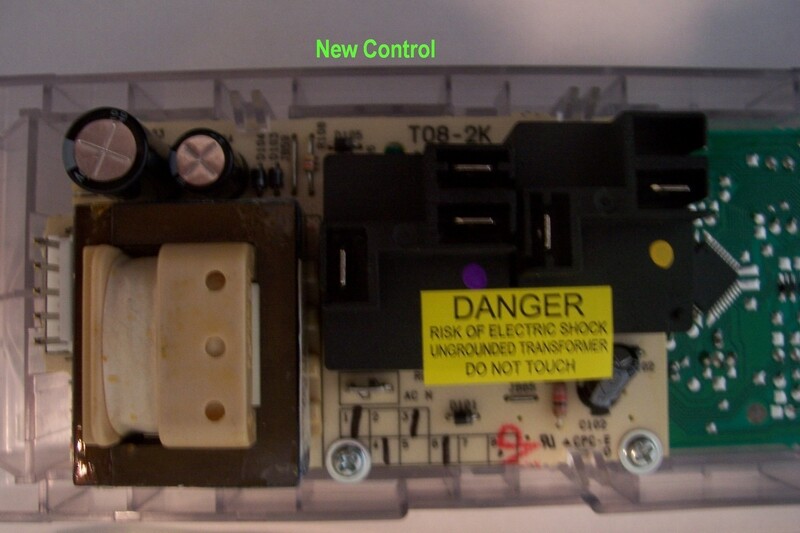
The oven that came with our new house has a faulty electronic clock control. The new control that was provided appears as though it will be very easy to install but the wire connections are arranged differently than the old control and the connection terminals on the new control are not marked in any way.
The old control was made by Torisan in China with the following identification: 971080989 Mod. RE00CXG002CB GE Mod. 16403147G002 On the old control the wires were connected as follows:
Wire Color Connector ID Red Line White N Blue (Black?) Broil Yellow Bake
The new control was made by TEGA in China with the following identification: WB27X10311 Mod. RE07CXP002CN-AA GE Mod. 191D2875P006
Again, the terminals on the new control are not identified in any way. Is it possible to get a schematic, sketch or description of how the wires are to be connected to the new control? If you cannot provide it,can you tell me where I might get the necessary information.
The attached sketch shows the general layout of the terminals and are colored for easy reference only. Can you tell me what color wire to attach to each terminal?
Looking at the board, there are 2 black relays, the one on the left is the broil relay, and next to it is the bake relay. now if you look closely at the relays, you will see they are marked COM, NC, NO. meaning common, normally open and normally closed. the relay on the right, hook the red wire to the COM terminal, and the blue wire to the NO terminal. On the next relay, Hook up the yellow wire to the NO terminal. The markings are there on the black plastic, just hard to see…And the white wire will go to the terminal marked N, it will be somewhere on the board, probably below one of the relays. Let me know
I am replaceing a WB27X10022 board with a WB27X10311 board as per recommendation. This post has helped and I understand all to this point. My problem is that I have an extra white wire comming from the bank of 4 lights on the front panel that tells the user if the burners on the top are still hot. I do not know where this wire hooks up to. Does it go to one of the terminal block wires (green or black in your attachment)? or to the same place as the main white neutral wire?
I never got a reply,but this is what I did. I saw that the the one of the white wires (the one from the light panel if I remember correctly), had an extra stub on it. I connected the other white wire on that stub then hooked both up to the connector on the new panel that the white was supposed to go to. It has worked correctly for a number of months now. I hope this helps.
Thanks for the response. Yes. I discovered the same thing. Also the yellow wire had a special clip end on it that was too big that I had to replace and voila, everything works! Thanks again for responding. Now, on to my Hotpoint dishwasher that doesn’t drain.
I am so glad this resource is here! It saved us from having to call the repair man. We are handy people, but when received the new control part the wire diagram was so different we were unsure of how to proceed (and after a month without an oven we were really ready to have it fixed!). I appreciate this info very much.