Brand:LG Model Number:LHTNS2403S Main Symptom:Not cold enough What happens & when
Refrigerator temp is about 45 degrees. This was recorded by taking the temp of water in a water bottle. The freezer is below freezing because it will create ice, but it’s not as fast as before. Prior to breakdown, fridge was loud/noisy and the noise would stop when the door was opened. Also, the freezer was frosty. I tried a manual reset by unplugging for 10 minutes. Then there was an unplanned power outage the next day of several hours. Temps seem colder now then upon initial breakdown, but not at the correct level.
Fridge was purchased 4/30/24.
My skill/knowledge level is probably about a 4 or 5.
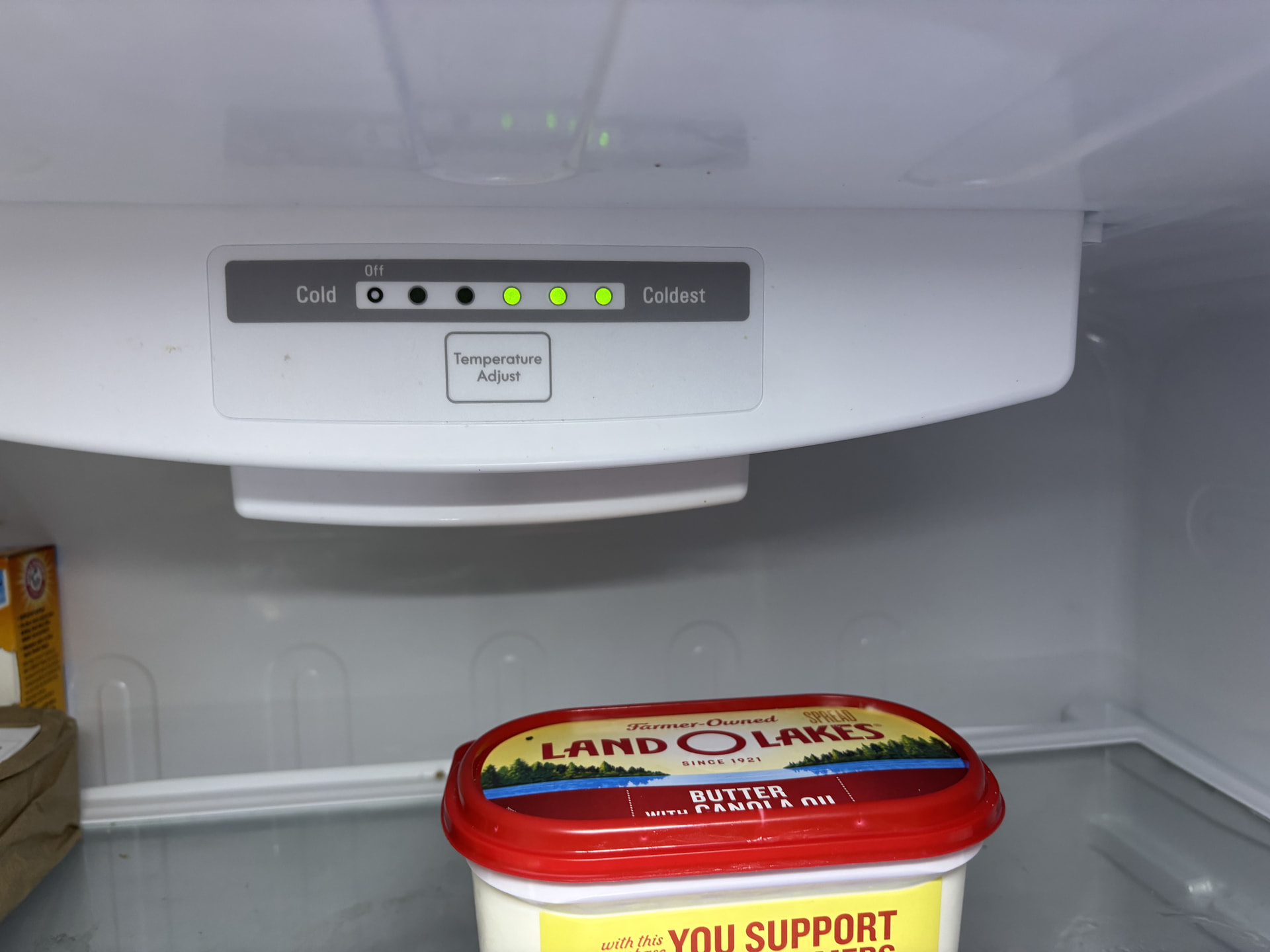
Temp display only shows the last three lights instead of all five
Based on what you’re describing with your LG refrigerator, model LHTNS2403S, I suspect you may have a problem with the evaporator fan or the automatic defrost system.
The biggest clue is that the refrigerator was making a loud noise that stopped when you opened the door, and you also noticed frost building up in the freezer.
That combination often means the evaporator fan was hitting ice that had accumulated around it. As the ice builds up, it can restrict airflow from the freezer into the refrigerator, causing both sections to become warmer than normal.
The fact that cooling improved after the power outage also supports the possibility of an ice buildup problem, although it doesn’t confirm it.
Here’s what I recommend checking first.
1. Check the freezer temperature.
Ideally, the freezer should be around 0°F, and the refrigerator should be between 35°F and 38°F.
Just because the freezer makes ice doesn’t necessarily mean it’s cold enough. It could be running at 15°F or 20°F, which would explain slower ice production.
If possible, place a thermometer in the freezer and check the temperature after several hours.
2. Check the evaporator fan.
Open the freezer door and listen for the fan. If it isn’t running, try pressing and holding the freezer door switch, if equipped, to simulate a closed door.
Depending on the refrigerator’s operating cycle, the fan may not run continuously.
If you hear scraping, rattling, or grinding, there’s a good possibility the fan blade is contacting ice.
3. Look for frost on the freezer’s rear interior panel.
If you see heavy frost or snow building up across the back panel, that usually points toward a defrost problem.
Possible causes include the defrost heater, defrost temperature sensor, or electronic control.
However, if the frost is concentrated around the fan, you could have an airflow or moisture intrusion problem instead.
4. About the temperature display.
The three illuminated lights may simply indicate the selected temperature setting rather than an error code. I wouldn’t replace a control board based on those lights alone.
For now, I would concentrate on checking the freezer temperature and looking for frost buildup.
LG’s service manual for this model also lists evaporator fan problems, blocked airflow, and defrost failures as possible causes of poor cooling.
ManualsLib
+1
One additional check: This model has a separate freezer temperature control. Make sure it’s around the middle setting (3) while troubleshooting.
Owners Manual (Page 14)
One question that will help narrow this down: When you noticed frost in the freezer, was it covering the food and freezer walls, or was it mainly building up on the back interior panel?
That distinction will help determine whether we’re dealing with a defrost problem, a door-sealing issue, or a fan problem before you spend money on parts.
Also, since your refrigerator was purchased in April 2024, it’s worth checking LG’s warranty before considering any expensive cooling-system repairs.
LG USA Product Support Page
For now, keep perishable food out of the 45°F refrigerator compartment until it can consistently maintain 40°F or below.
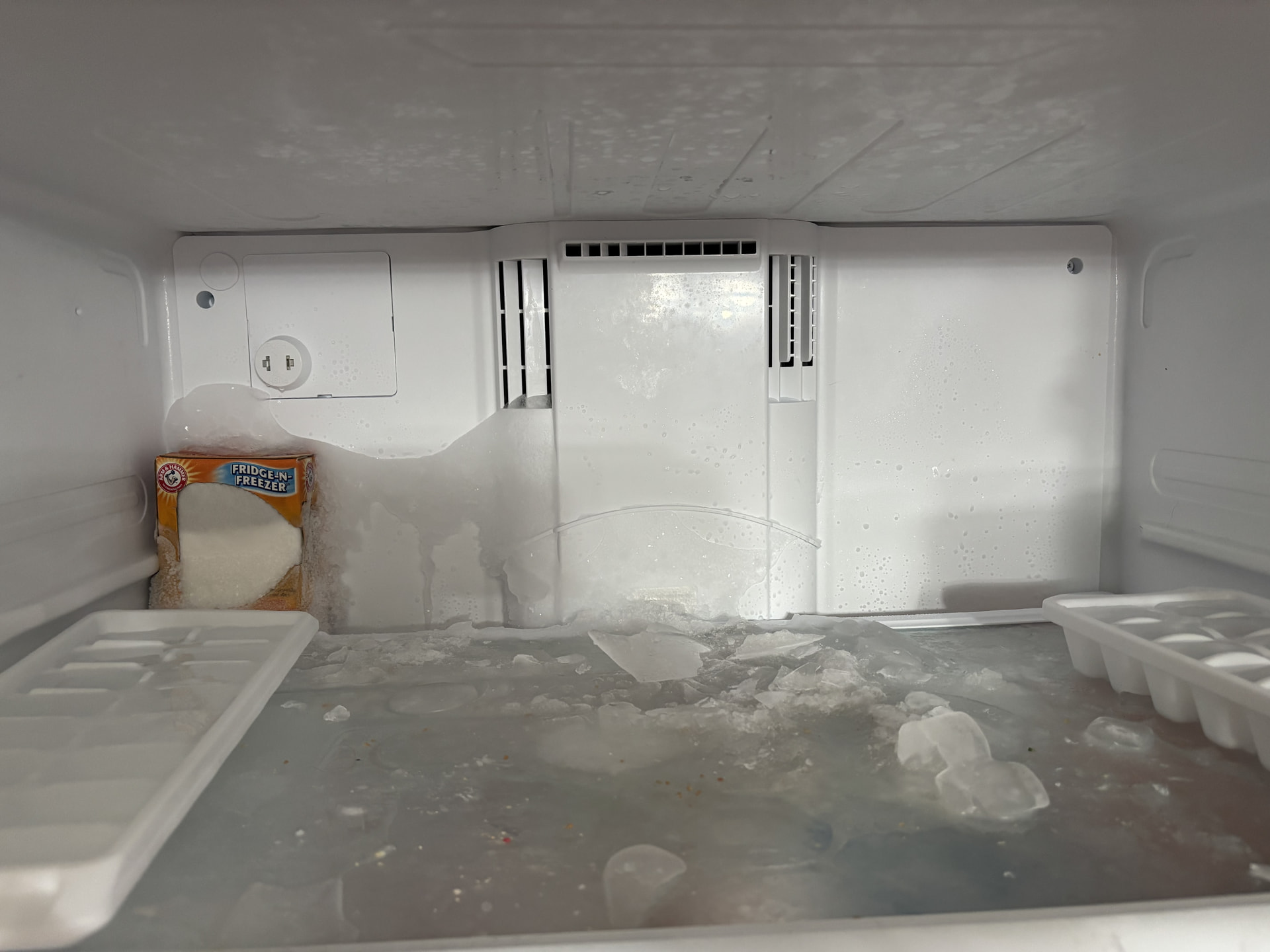
Frost was covering food and freezer walls. I checked on warranty and I think it’s only 1 year.
I didn’t know there was separate freezer control.
I will purchase a freezer/refrigerator thermometer and let you know the freezer temp. I know it’s not the proper termp because of the slower ice creation.
All five lights were illuminated when working properly. One light ( warmest ) to five lights ( coldest).
Thanks for the update! Those freezer temperature swings from -2°F to 30°F and then back down to 18°F are interesting, especially with the refrigerator sitting at 52°F.
The freezer should generally stay near 0°F, and the refrigerator should be around 37–40°F. Some temperature fluctuation is normal during defrost cycles, but we need to determine why the refrigerator isn’t cooling properly.
When you get a chance, I’d like you to check a couple of things:
Freezer door: Make sure it’s closing completely and the gasket is sealing all the way around.
Evaporator fan: Open the freezer door and listen for the fan. If it stops when the door opens, press the door switch to see whether it starts running again.
Frost buildup: Check the freezer’s rear interior wall for any unusual frost or ice buildup.
Temperature readings: If possible, place a thermometer in a glass of water on the refrigerator’s middle shelf. This will give us a more reliable reading than the air temperature.
Since you previously mentioned that the refrigerator was making noise that stopped when the door opened, I’m particularly interested in the evaporator fan and possible frost buildup.
For now, I wouldn’t replace any parts. Let’s see what you find when you check the freezer door and fan.
Also, with the refrigerator at 52°F, move perishable foods somewhere cold until we get this resolved.
Since you’ve been seeing the refrigerator temperature around 52°F and the freezer temperature fluctuating, checking the defrost system is a good next step.
1. Accessing the defrost heater and thermostat
Unplug the refrigerator.
Remove the food, ice bin, and shelving from the freezer.
Remove the screws securing the rear interior freezer panel.
Carefully release the panel clips and pull the panel forward. Disconnect any fan wiring if necessary.
You’ll now be able to see the evaporator coil and defrost components.
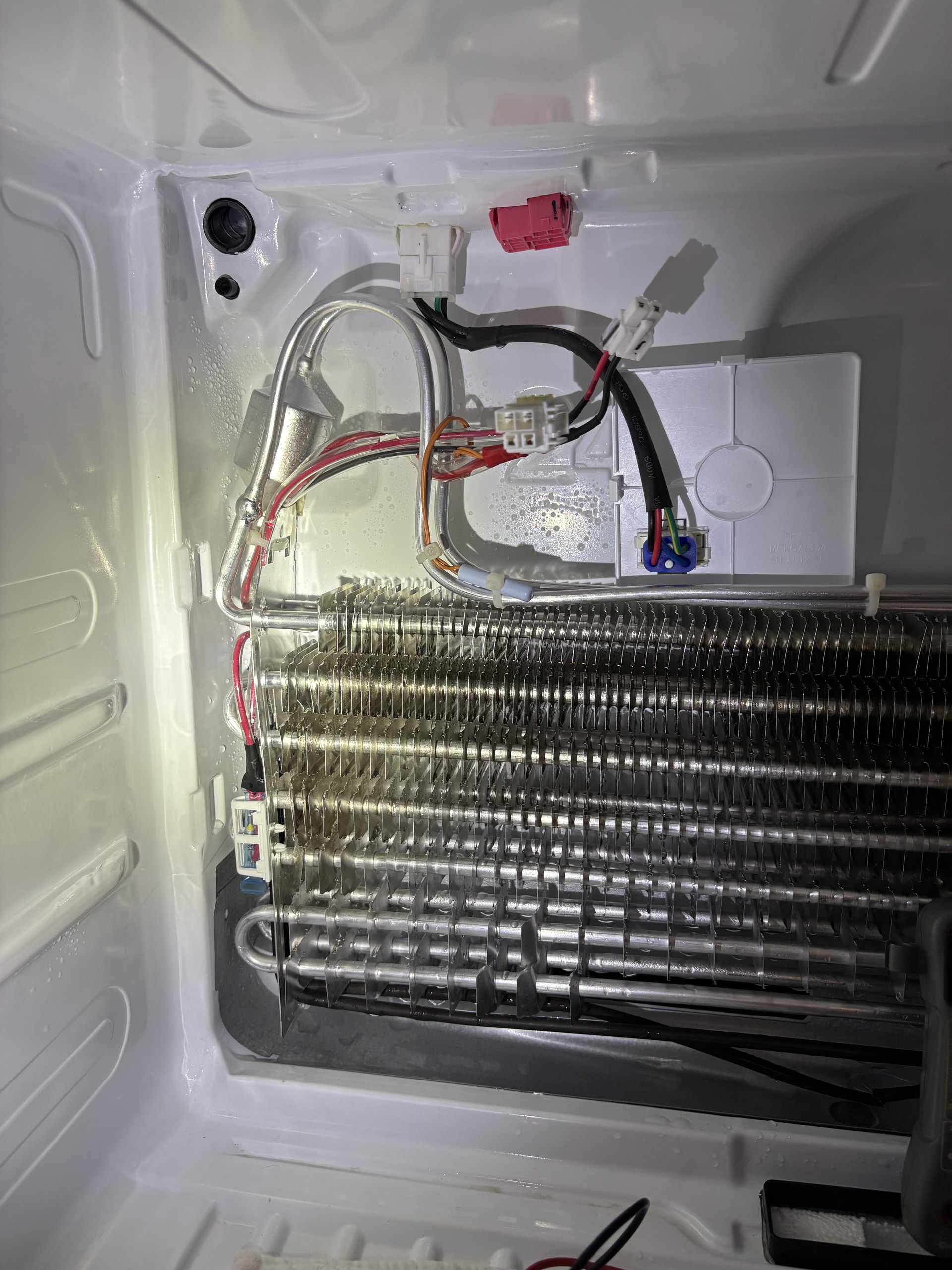
The defrost heater is mounted along the evaporator assembly, typically near the bottom of the coil. The defrost thermostat, if this version uses a separate one, is attached to the evaporator tubing near the upper portion.
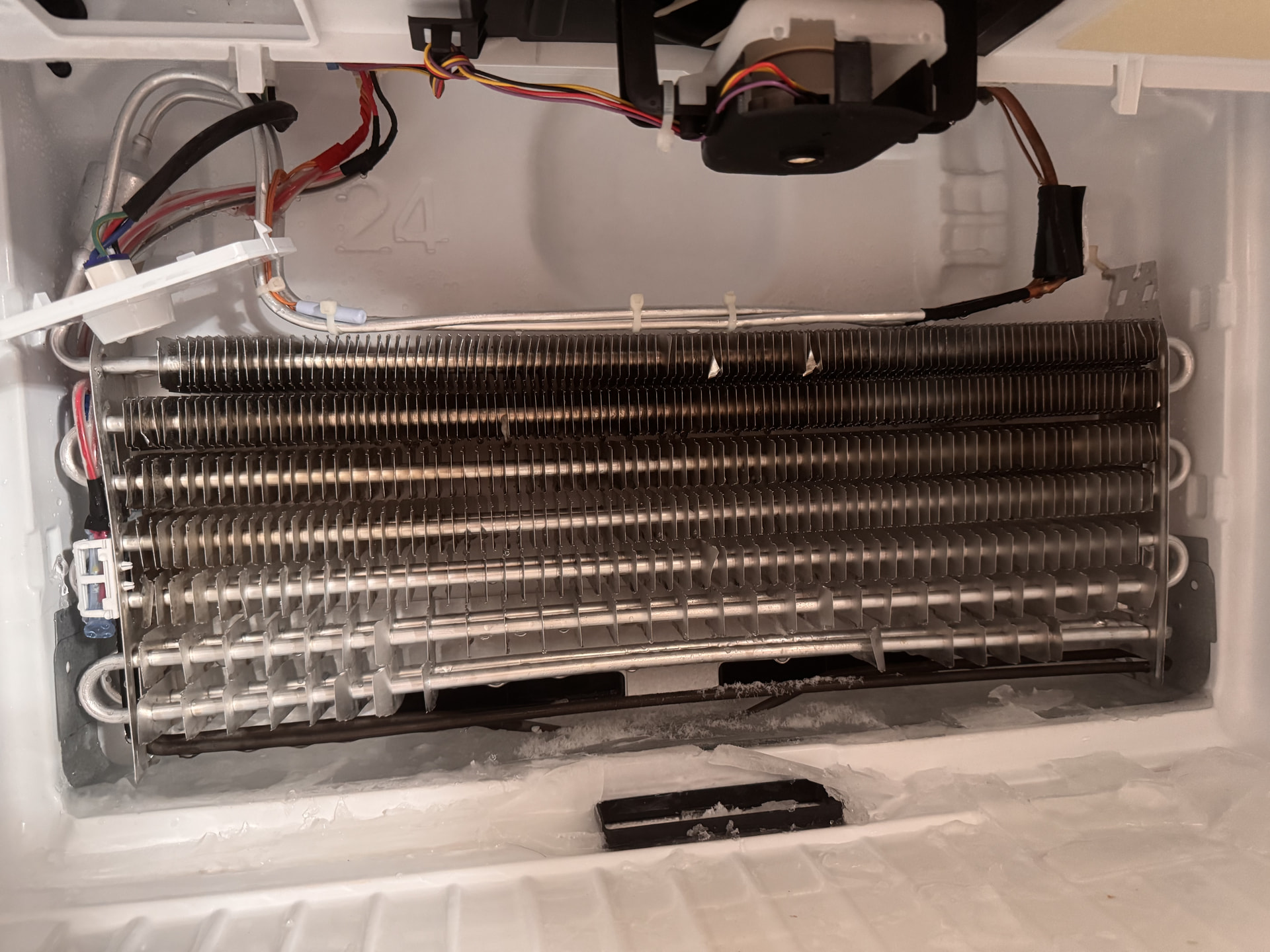
Before removing anything, look at the frost pattern. If the entire evaporator is packed with snow and ice, that points toward a possible defrost problem. If only one small section is frosted, we may be dealing with a different cooling issue.
2. Testing the defrost heater
The service information for the LHTNS2403S/00 identifies a separate evaporator heater circuit.
Keep the refrigerator unplugged.
Disconnect the heater’s electrical connector.
Set your multimeter to resistance (Ω).
Measure across the heater’s two terminals.
Meter reading
Meaning
Finite resistance
Heater has continuity
OL or infinity
Heater is open and needs replacement
Near 0 Ω
Possible short; verify against specifications
Also check each heater terminal to the metal evaporator frame. There should be no continuity.
3. Testing the defrost thermostat or sensor
An important detail: LG’s service manual identifies a defrost temperature sensor and a thermal safety fuse, rather than relying solely on a traditional mechanical defrost thermostat.
The sensor changes resistance as its temperature changes. The manual provides these approximate readings:
Sensor temperature
Resistance
23°F - 38 kΩ
32°F - 30 kΩ
41°F - 24 kΩ
50°F - 19.5 kΩ
59°F - 16 kΩ
Disconnect the sensor before measuring it. Compare the reading to its actual temperature. An open or shorted sensor is defective.
4. Replacing the components
With the refrigerator unplugged:
Heater: Disconnect the wiring, release the mounting clips, and carefully remove it from the evaporator. Install the replacement in the same position without bending or puncturing the refrigerant tubing.
Sensor: Disconnect its connector, release it from the evaporator tubing, and install the replacement in the same location.
Thermal fuse: If the fuse is open, replace the specified fuse or harness assembly. Never bypass it.
Reinstall the evaporator cover completely before operating the refrigerator.
5. Built-in defrost diagnostic test
Your model also has a service test available at the main control board.
According to the LG service manual:
First press of the test button: compressor and freezer fan ON, heater OFF.
Second press: compressor and freezer fan OFF, defrost heater ON.
This allows a technician to check whether the board can energize the heater. It involves live electrical testing, so use this only if you’re comfortable working around energized components.
One thing I’d like you to check first: When you remove the freezer’s rear panel, is the evaporator coil completely covered in heavy frost and ice, or is there only a light coating of frost on part of the coil?
That will help determine whether we should concentrate on the defrost heater and sensor or investigate the cooling system itself.
With the evaporator cover removed, locate the drain trough underneath the evaporator coil.
Check for standing water, ice buildup, or debris blocking the drain hole.
If the drain is frozen, melt the ice using warm water or a hair dryer on low heat, keeping the dryer moving and away from plastic parts and wiring. Never chip away ice with a sharp tool.
Once the ice is cleared, use a turkey baster or squeeze bottle to flush warm water through the drain opening.
The water should flow freely through the drain tube into the condensate pan underneath the refrigerator.
If water backs up, check the drain tube and its outlet near the compressor for debris or blockage.
Important: The drain trough inside the freezer and the condensate pan underneath the refrigerator are two different parts. The trough collects defrost water, while the lower pan catches that water so it can evaporate.
LG’s service information specifically lists a clogged defrost drain as one possible cause to check when troubleshooting excessive freezer frost.
ManualsLib
One important distinction: A clogged drain can cause ice buildup and water leakage, but it doesn’t automatically mean the defrost heater or sensor is bad. If the evaporator is heavily frosted over, test those components separately.
LG recommends allowing frozen drains to thaw naturally rather than using a hair dryer or boiling water, which can damage plastic parts.
LG USA Support
Once the drain is clear and water flows into the lower pan, you can finish checking the heater and defrost sensor before reassembling the freezer.
For your LG LHTNS2403S refrigerator, the defrost drain is located underneath the evaporator coil behind the rear panel inside the freezer. When this drain becomes clogged with ice or debris, defrost water cannot flow down to the drain pan underneath the refrigerator.
Here’s how to check and clear it.
Step 1: Access the defrost drain
Unplug the refrigerator.
Remove the food, shelves, and ice maker components if they interfere with access.
Remove the screws securing the rear interior freezer panel.
Carefully pull the panel forward. If it feels stuck, don’t force it. Ice may be holding it in place.
Disconnect any fan wiring if necessary to remove the panel completely.
You should now see the evaporator coil and, directly underneath it, the drain trough with a small drain hole.
Step 2: Check for a clogged drain
Look for the following:
A sheet of ice covering the bottom of the freezer.
Ice filling the drain trough underneath the evaporator.
A drain opening blocked with ice or debris.
Water standing in the trough rather than draining away.
Quick test: Once the drain opening is exposed and free of surface ice, slowly pour a small amount of warm water into the trough.
If the water drains freely, the passage is open. If it backs up or remains in the trough, there’s likely a blockage.
Step 3: Clear the defrost drain
Melt any visible ice using warm water and a turkey baster or squeeze bottle.
Use towels to absorb the excess water.
Continue flushing warm water directly into the drain opening.
If the water won’t pass through, use a flexible plastic tube or nylon line to gently loosen the blockage.
Flush again until the water flows freely.
Important: Don’t use boiling water, sharp metal tools, or excessive force. These can damage the plastic drain trough, drain tubing, or evaporator components.
Step 4: Check the drain tube underneath the refrigerator
Keep the refrigerator unplugged.
Pull it away from the wall.
Remove the lower rear access cover.
Locate the drain pan near the compressor.
Follow the drain tube down toward the pan.
Check the tube outlet for dirt, slime, or an ice blockage.
Clean the outlet and flush the drain from inside the freezer again.
You should see water coming out of the tube and entering the drain pan. That confirms the drain is clear.
Step 5: Reassemble and check operation
Once the drain flows freely:
Dry the freezer drain trough.
Reinstall the evaporator cover and reconnect the fan.
Reinstall the shelves and other components.
Plug the refrigerator back in.
Allow approximately 24 hours for temperatures to stabilize.
Yes, the drain trough was filled with ice and the drain opening was covered. You might be able to see it in the 2nd picture from the bottom of this post.
Is my thermostat good? I had a reading of 0.2? Temp was around 55 degrees. That’s nowhere close to your chart I had the ohm meter on 200 ohms when I tested.
Drain tube is clear. Reassembled. Freezer at 30 degrees in a short time on setting of 3. All lights illuminated now on refrigerator temperature control Slowly adjusting refrigerator temperature