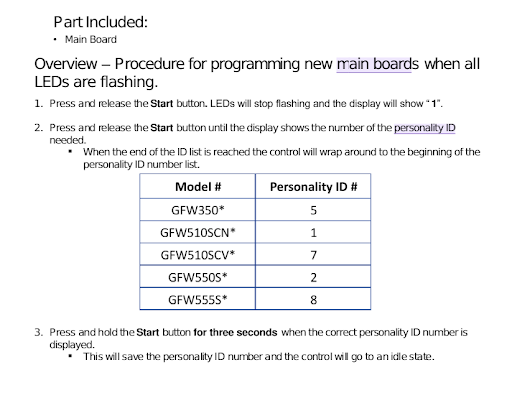
Brand:GE Model Number:GFW550SSN1WW Main Symptom: Replaced main control, restored power but not showing correctly What happens & when:Reset control panel
Error Code (if any): was flashing 88, but after control panel reset just reading incorrectly
Parts or tests already tried:
Photos / video link:
On GE front-load washers, if the display is scrambled, showing wrong options, or not matching the model after replacing the main control, the new board often needs to be configured/programmed with the correct personality ID. A replacement control may not automatically know which model it’s installed in.
Try this first:
Disconnect power for 2–5 minutes.
Restore power.
Enter Service Mode.
Check the Personality/Model Configuration setting and program it for model GFW550SSN1WW.
Exit service mode and cycle power.
If the display is still incorrect:
Verify the replacement control board is the correct part number for GFW550SSN1WW.
Check the UI/control-panel harness connections at both the main board and user interface.
Inspect ribbon cables for bent pins or poor connections.
If you can tell me:
What exactly the display is showing (blank, wrong characters, wrong cycles, flashing LEDs, etc.)
The part number of the new control board
I can provide the specific GE service-mode steps and personality setting procedure for this model.
It is showing wrong characters now after I I tried to reset control panel but It initially was flash 88. How do you enter service mode how do you check personality/Model configuration and then exit?
For a GFW550SSN1WW with a replacement WH22X38697 main board, you must enter the washer’s model configuration in Service Mode after installation.
Enter Configuration Mode
Washer plugged in and idle.
Press and hold Power and Start/Pause together for about 5 seconds to enter Service Mode.
Rotate the cycle knob until t01 (or Configuration) appears.
Press Start/Pause to enter.
Rotate the knob to select the correct model configuration.
Press Start/Pause to save.
Exit Service Mode by pressing Power. (Procedure varies slightly by software version.)
Important
The GFW550SSN1WW requires a specific configuration code. GE does not publish the code on public parts sites; it is normally supplied on the instruction sheet packaged with the replacement board or through GE service documentation.
The GE GFW550SSN1WW is a 4.8 cu. ft. smart front-load washer. In appliance terminology, “ssd” most commonly refers to a Diagnostic (Service) Mode code for Sud Error, meaning the washer has detected too much suds/soap, or an issue with the water-level pressure sensor. [1, 2]
A “Sud” code on this machine is typically triggered by using too much detergent or the wrong type (you must use HE/High-Efficiency detergent). [1]
How to Clear a Suds Error
Hard Reset: Hold the Start/Pause button for 5 seconds to cancel the current cycle and reset the machine.
Empty & Rinse: Run a Drain & Spin cycle to empty the soapy water. If the suds are excessive, you may need to manually bail out the water and wipe the drum.
Run a Clean Washer Cycle: Run an empty cycle using only a cup of white vinegar to break down residual soap.
Check Your Detergent: Always use HE detergent and never fill past the manufacturer’s fill line. [1]
Troubleshooting Pressure System (SSD/Error)
If “ssd” is appearing alongside filling, draining, or spinning issues and isn’t related to soap, it could be a fault with the water level/pressure sensing system.
Clean the Drain Pump Filter: Front-load washers have a filter at the bottom left that traps lint and debris. If it gets blocked, the machine cannot drain, triggering sensor errors. [1]
Check the Hose: Ensure the drain hose behind the washer isn’t kinked or clogged. [1]
Enter Diagnostic Mode: You can force the machine to test the pressure sensor and other components. To do this, press and hold the Start/Pause button, then turn the cycle knob 8 clicks in either direction. Release the button; the error codes will display on the screen. [1, 2]
If you want, let me know:
What error code exactly is displaying on the screen (e.g., SD, E-codes)?
What symptoms the washer is showing (e.g., won’t drain, won’t spin, leaking)?
I can provide exact next steps to fix the issue or help you find replacement parts.